Executive Summary
Key Findings
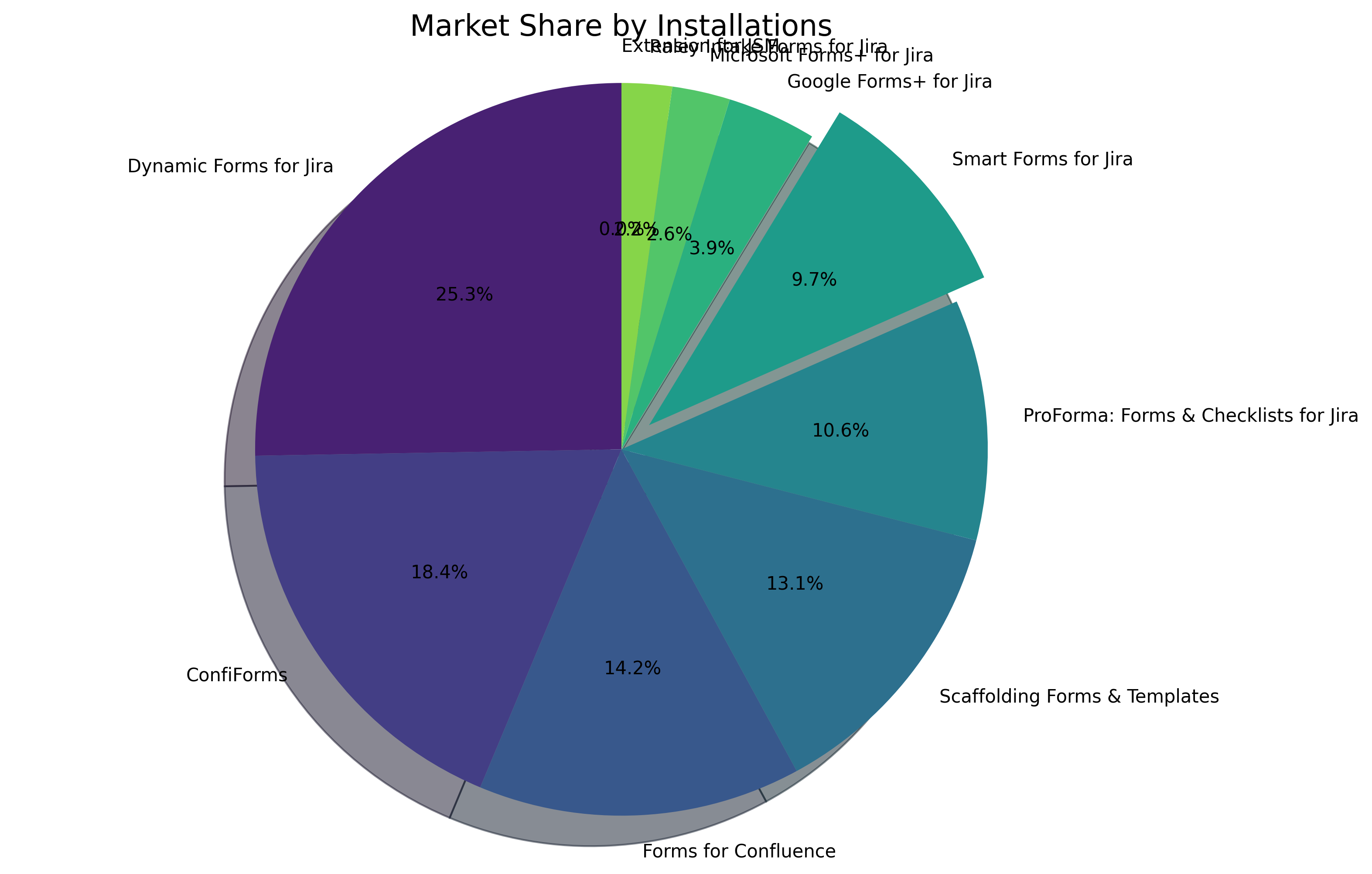
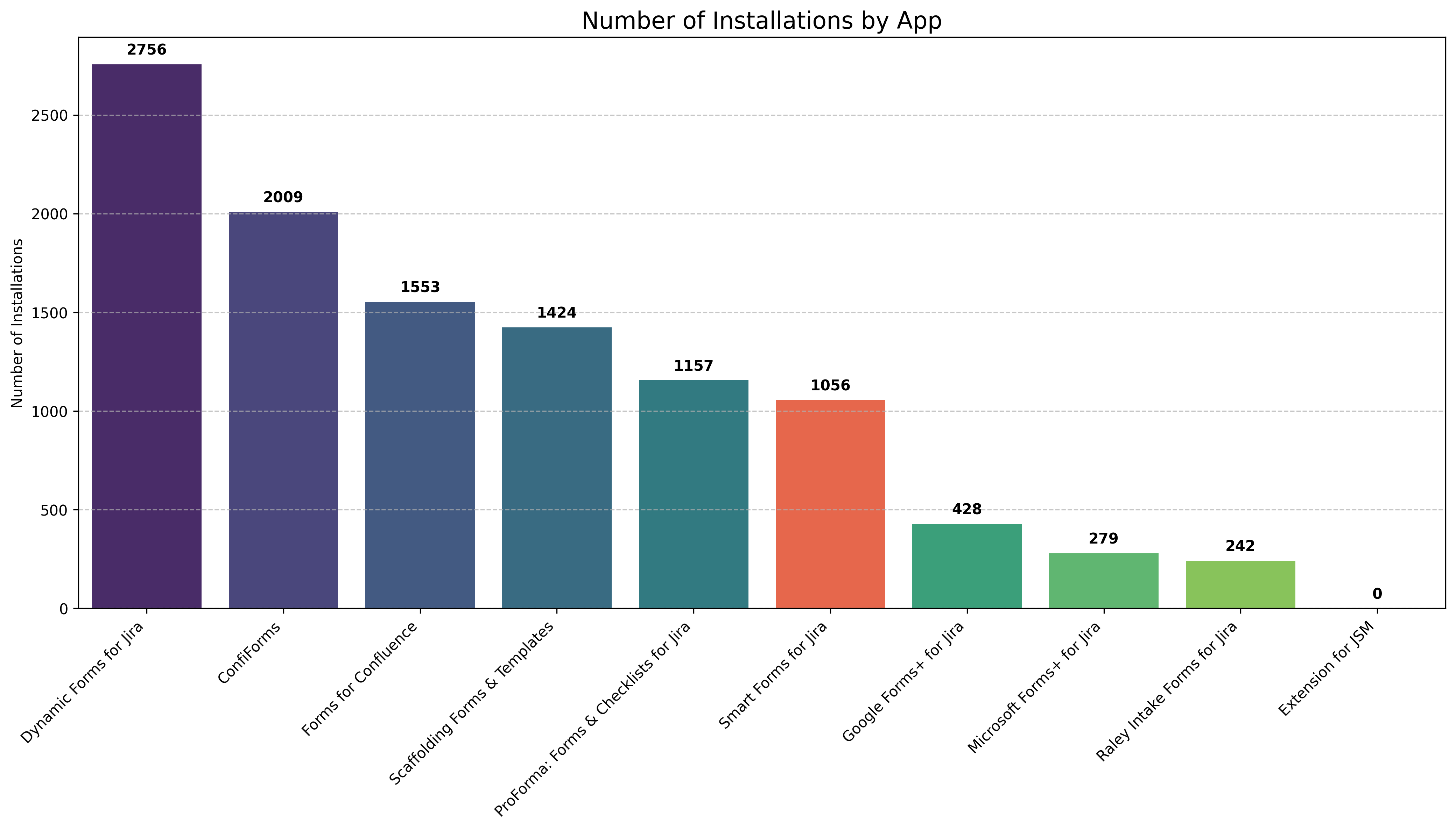
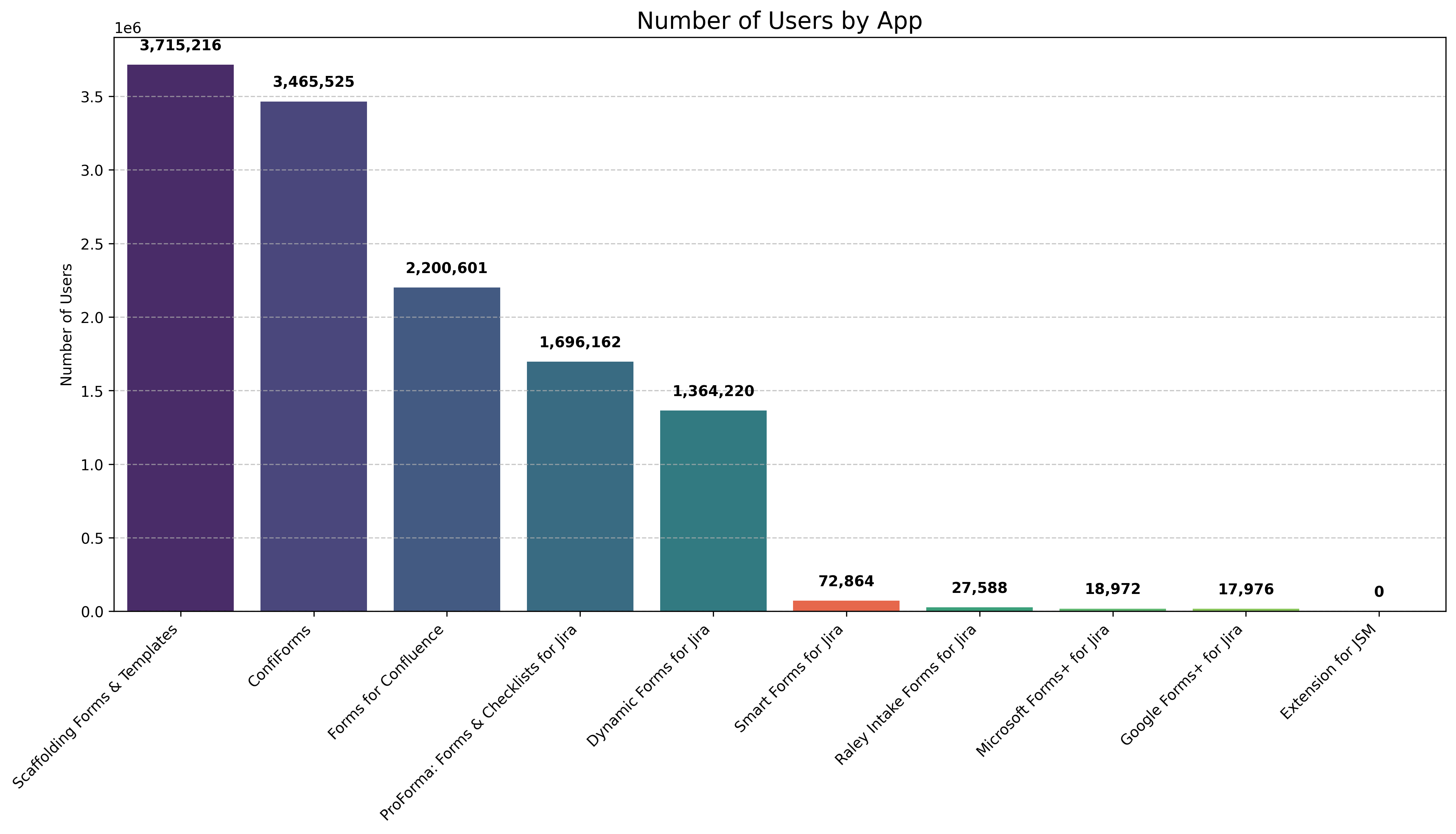
Smart Forms for Jira holds a 9.7% market share by installations in the forms and templates market segment for Atlassian products, positioning it as a significant player in this competitive space. With 1,056 installations and over 72,800 users, it demonstrates strong adoption despite facing competition from both direct and indirect competitors.
Market Position
Market Share
User Rating
User Base
This analysis examines Smart Forms for Jira's position in the Atlassian Marketplace, comparing it against both direct competitors (form-specific solutions) and indirect competitors (broader solutions with form capabilities). The report provides insights into market share, user adoption, pricing strategies, and customer satisfaction to help inform strategic decisions.
Market Overview
The forms and templates market within the Atlassian ecosystem is diverse, with solutions ranging from dedicated form builders to broader platforms with form capabilities. This market can be segmented into:
- Direct Competitors: Specialized form solutions for Jira (ProForma, Raley Intake Forms, Google Forms+, Microsoft Forms+)
- Indirect Competitors: Broader platforms with form capabilities (Dynamic Forms, Extension for JSM, ConfiForms, Scaffolding Forms & Templates, Forms for Confluence)
The total market size based on our analysis encompasses:
- Total installations across all analyzed products: 10,904
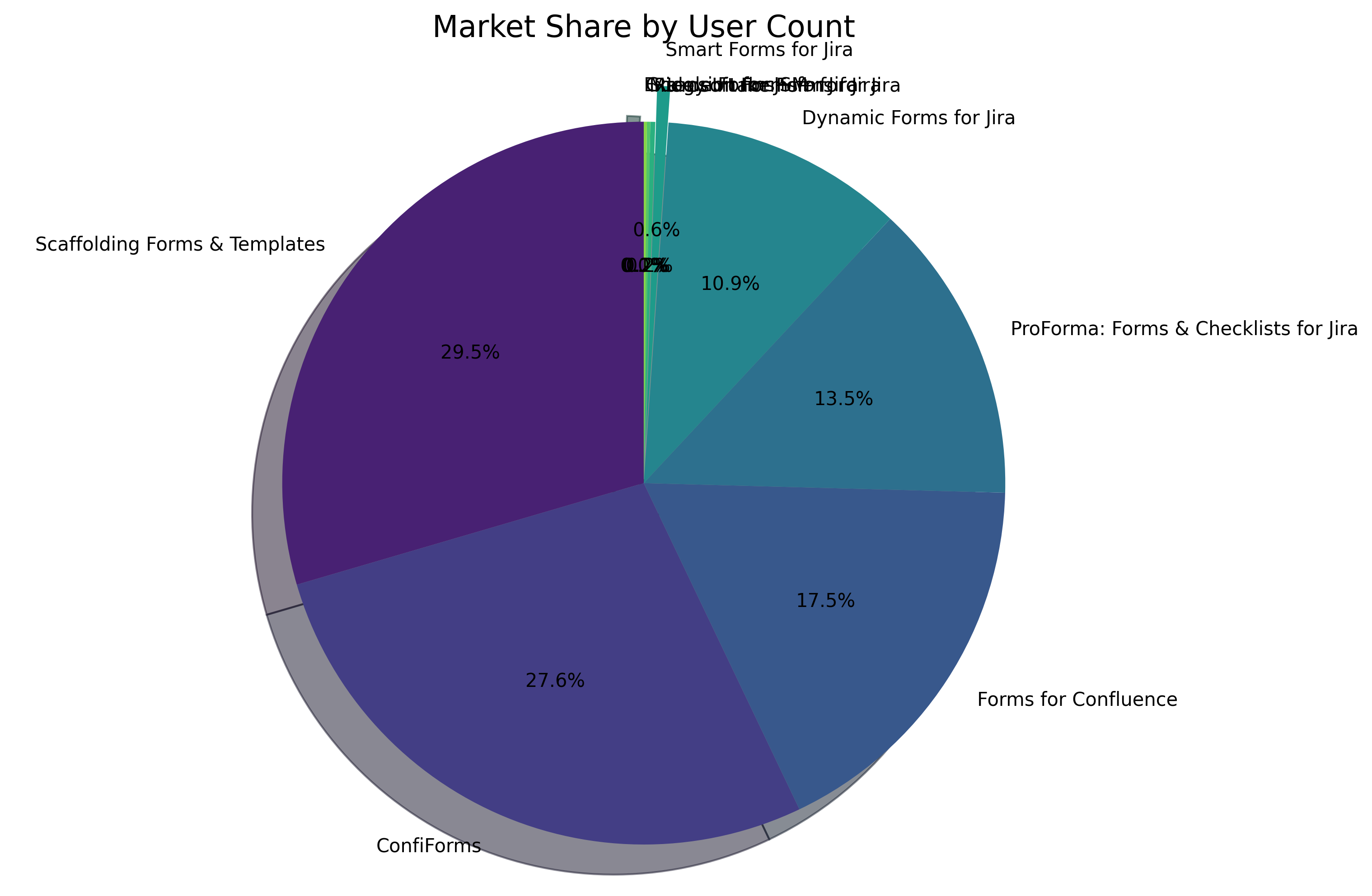
- Total user base: 12,563,122
- Average customer rating: 3.6/5
Market Share by Installations
Market Share by User Count
Market Trends
The forms market in the Atlassian ecosystem shows a trend toward integrated solutions that offer more than just form creation. Products that provide workflow automation, data management, and integration capabilities are gaining traction. There's also increasing demand for solutions that work across multiple Atlassian products (Jira, Confluence, etc.) rather than being limited to a single platform.
Competitive Analysis
Installation & User Base Comparison
Number of Installations by App
Number of Users by App
Direct Competitors Analysis
| App Name | Vendor | Installations | Users | Rating | Key Strengths | Key Weaknesses |
|---|---|---|---|---|---|---|
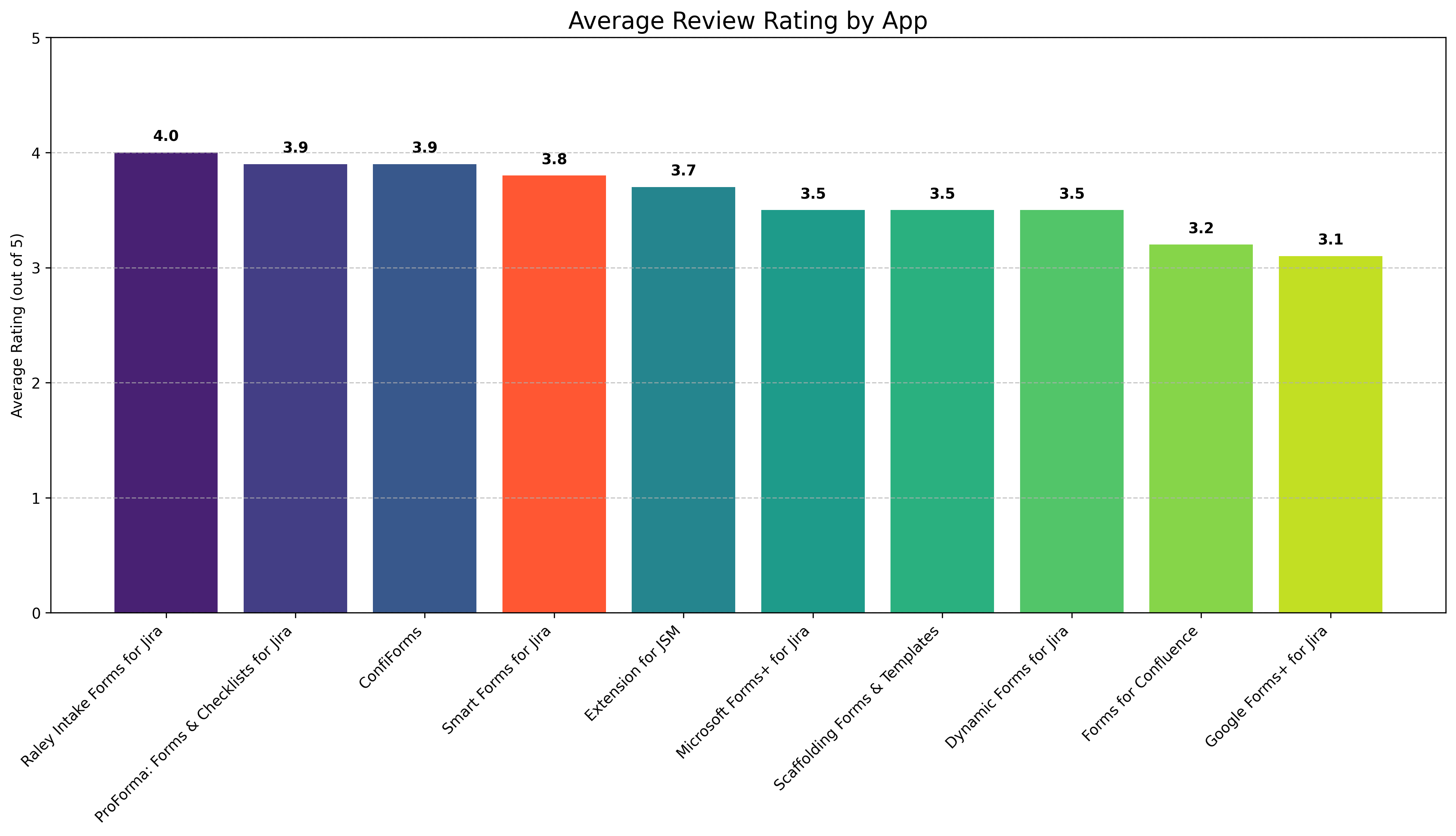
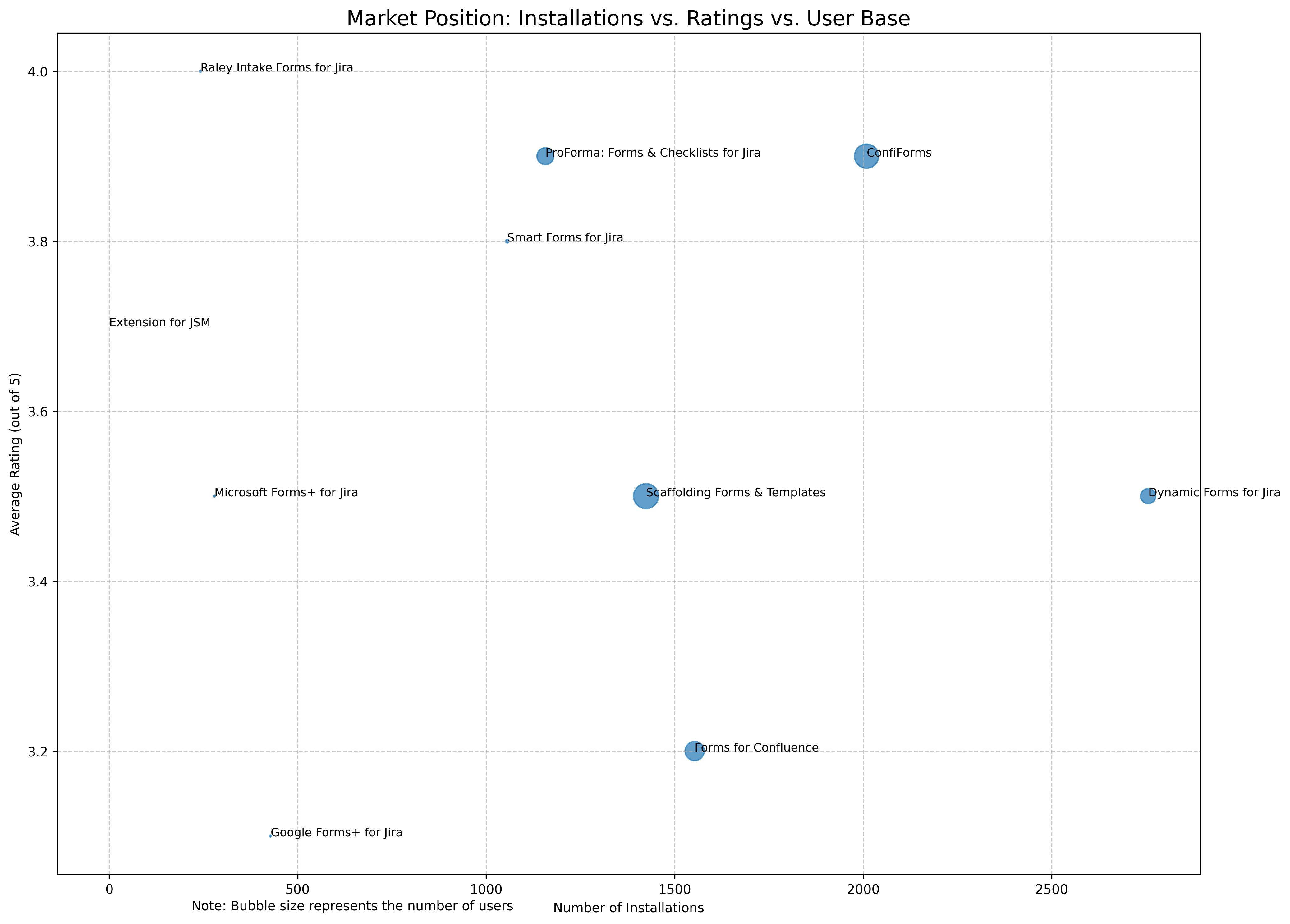
| Smart Forms for Jira | SaaSJet | 1,056 | 72,864 | 3.8/5 | Works across multiple Atlassian products (JSM, JWM, JPD & Confluence), strong automation capabilities | Higher price point than some competitors, steeper learning curve |
| ProForma: Forms & Checklists for Jira | Atlassian | 1,157 | 1,696,162 | 3.9/5 | Atlassian-owned, deep integration, large user base | Limited to server and data center deployments, no cloud option |
| Raley Intake Forms for Jira | Inversion Point LLC | 242 | 27,588 | 4.0/5 | Highest user rating, focused on intake processes | Limited installations, narrower feature set |
| Google Forms+ for Jira | Apps+ | 428 | 17,976 | 3.1/5 | Google Forms integration, low price point | Lower user rating, limited to Google Forms functionality |
| Microsoft Forms+ for Jira | Apps+ | 279 | 18,972 | 3.5/5 | Microsoft Forms integration, low price point | Limited installations, dependent on Microsoft ecosystem |
Indirect Competitors Analysis
| App Name | Vendor | Installations | Users | Rating | Key Strengths | Key Weaknesses |
|---|---|---|---|---|---|---|
| Dynamic Forms for Jira | Deviniti | 2,756 | 1,364,220 | 3.5/5 | Highest installation count, dynamic field capabilities | Mixed reviews on cloud version, some usability issues |
| Extension for JSM | Deviniti | N/A | N/A | 3.7/5 | Strong JSM integration, good reviews | Limited data on installations and user base |
| ConfiForms | Vertuna LLC | 2,009 | 3,465,525 | 3.9/5 | Large user base, high rating, Confluence-focused | Steep learning curve, primarily for Confluence |
| Scaffolding Forms & Templates | Appfire | 1,424 | 3,715,216 | 3.5/5 | Large user base, strong template capabilities | Primarily for Confluence, complex for simple forms |
| Forms for Confluence | Kolekti | 1,553 | 2,200,601 | 3.2/5 | Specialized for surveys and feedback in Confluence | Lower rating, limited to Confluence |
User Satisfaction Analysis
Average Review Rating by App
Review Sentiment Analysis
Based on the review data collected, we analyzed the sentiment and common themes in user feedback:
Smart Forms for Jira - Review Highlights
Positive Themes:
- Strong automation capabilities
- Works well across multiple Atlassian products
- Responsive support team
- Customization options
Negative Themes:
- Learning curve for complex features
- Some setup complexity
Sample Review: "One of our best tools in Jira service management, has allowed us to tap into automation for onboarding and offboarding, saving out team time. Was also impressed by the availability of SaaSJet to demo the product and provide technical help, incredibly responsive."
ProForma: Forms & Checklists for Jira - Review Highlights
Positive Themes:
- Deep integration with Jira
- Conditional fields functionality
- Responsive support
Negative Themes:
- Limited attachment support (mentioned as coming soon)
- Some limitations with field linking
Sample Review: "ProForma has been a crucial piece of our Jira platform since day one. The only reason we wanted it in the first place was as a solution for our legacy business forms that needed to migrate into our new service center, but that had fields too specific to use in more than one place. ProForma probably saved us from creating and managing 100+ fields right off the bat."
Raley Intake Forms for Jira - Review Highlights
Positive Themes:
- User-friendly forms
- Hidden fields and field conditions
- Exceptional support team
Negative Themes:
- Some bugs reported (though quickly fixed)
Sample Review: "Incredibly satisfied with this app. It has a lot of potential, for example it has hidden fields and field conditions without coding, it is easy to use and understand and the result is a user-friendly form. It has been a crucial tool for me, coupling it with some automation I have used it extensively."
Google Forms+ for Jira - Review Highlights
Positive Themes:
- Easy integration with Google Forms
- Simple to use
Negative Themes:
- Limited functionality beyond basic Google Forms integration
- Some users reported issues with the integration
Sample Review: "Very Nice" (Limited detailed reviews available)
Microsoft Forms+ for Jira - Review Highlights
Positive Themes:
- Good integration with Microsoft Forms
- Works well for Microsoft-centric organizations
Negative Themes:
- Limited issue type filtering
- Some integration limitations
Sample Review: "This would be substantially better if I could limit it to certain issue types within a project."
Pricing Analysis
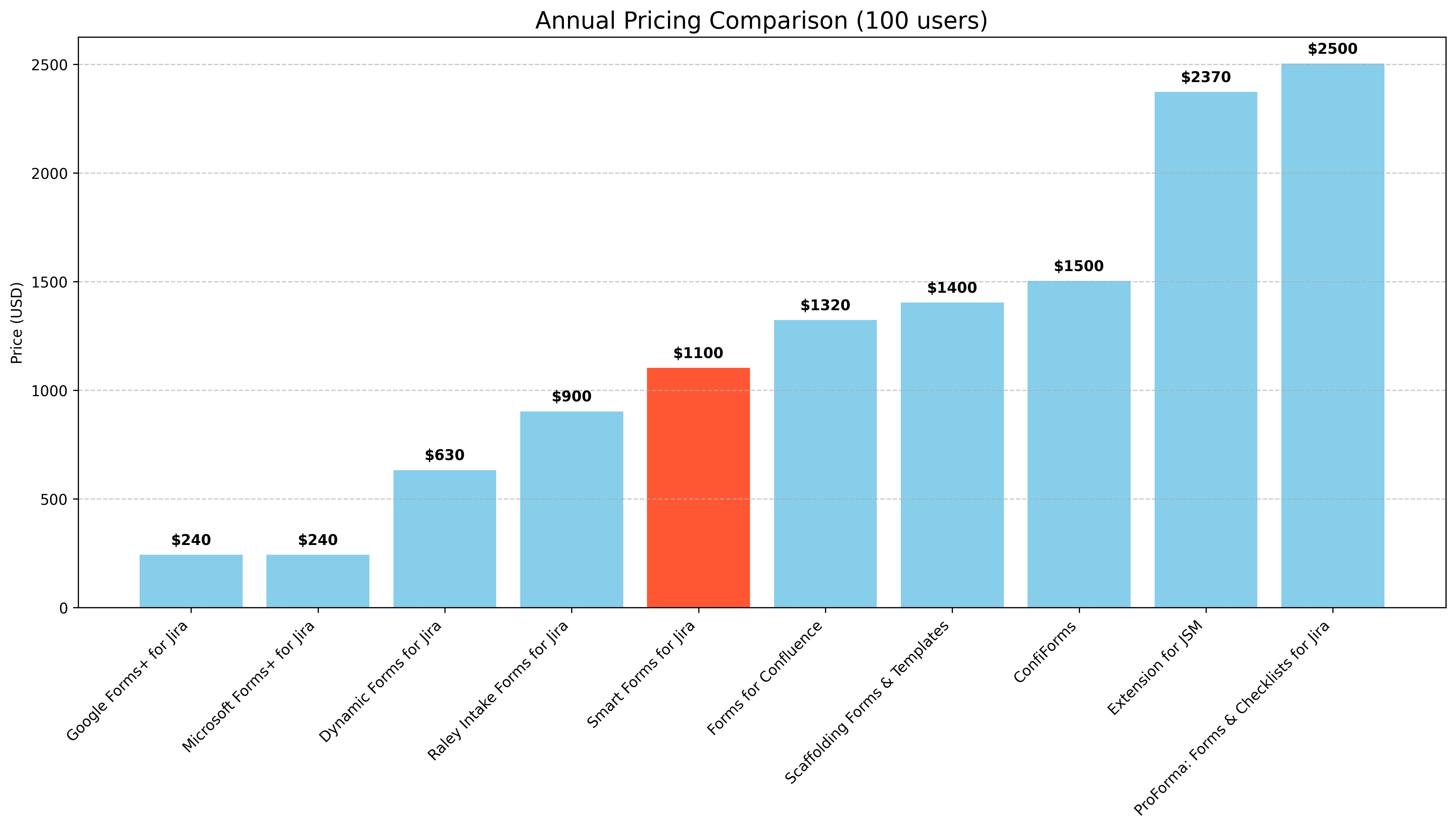
Annual Pricing Comparison (100 users)
Pricing Strategy Comparison
The pricing strategies across the forms market segment vary significantly:
| App | Annual Price (100 users) | Pricing Model | Free Tier | Pricing Strategy |
|---|---|---|---|---|
| Smart Forms for Jira | $1,100 | Per user, tiered | No | Premium pricing with comprehensive features |
| ProForma: Forms & Checklists for Jira | $2,500 (DC) | Per instance, tiered by user count | No | Premium pricing as an Atlassian-owned product |
| Raley Intake Forms for Jira | $900 | Per user, tiered | No | Mid-range pricing with specialized features |
| Google Forms+ for Jira | $240 | Per user, tiered | Yes (limited) | Low-cost integration strategy |
| Microsoft Forms+ for Jira | $240 | Per user, tiered | Yes (limited) | Low-cost integration strategy |
| Dynamic Forms for Jira | $630 | Per user, tiered | No | Value pricing for dynamic field capabilities |
| Extension for JSM | $2,370 | Per user, tiered | No | Premium pricing for specialized JSM features |
| ConfiForms | $1,500 | Per instance, tiered by user count | No | Premium pricing for comprehensive Confluence forms |
Pricing Insights
Smart Forms for Jira positions itself in the mid-to-premium segment of the market. At $1,100 annually for 100 users, it's more expensive than simple integration solutions like Google Forms+ ($240) but more affordable than specialized solutions like Extension for JSM ($2,370) or ProForma ($2,500 for Data Center). This pricing strategy suggests a value proposition based on comprehensive features and cross-product functionality rather than being the lowest-cost option.
Market Position Analysis
Market Position: Installations vs. Ratings vs. User Base
SWOT Analysis: Smart Forms for Jira
Strengths
- Cross-Product Functionality: Works across multiple Atlassian products (JSM, JWM, JPD & Confluence), providing a unified forms solution
- Strong User Rating: 3.8/5 rating indicates good user satisfaction
- Automation Capabilities: Reviews highlight strong automation features that save time
- Responsive Support: Multiple reviews mention excellent customer support
- Customization Options: Offers extensive customization for different use cases
Weaknesses
- Market Share: 9.7% market share by installations places it behind several competitors
- Learning Curve: Some reviews mention a steeper learning curve compared to simpler solutions
- Price Point: Higher price than some competitors may limit adoption by price-sensitive customers
- User Base: Smaller user base compared to some competitors may impact ecosystem development
Opportunities
- Cross-Product Integration: Further leverage cross-product functionality as a key differentiator
- Automation Expansion: Expand automation capabilities to address more complex workflows
- Market Education: Develop resources to reduce learning curve and highlight ROI
- Tiered Pricing: Consider entry-level pricing tiers to capture more price-sensitive segments
- Partner Ecosystem: Develop partnerships with complementary Atlassian apps
Threats
- Atlassian-Owned Competition: ProForma being owned by Atlassian gives it potential advantages in integration and visibility
- Low-Cost Alternatives: Google Forms+ and Microsoft Forms+ offer much lower price points for basic functionality
- Market Consolidation: Potential for acquisitions or mergers in the forms market
- Feature Parity: Competitors catching up on cross-product functionality
- Atlassian Platform Changes: Changes to Atlassian's platform or API could impact functionality
Strategic Recommendations
Short-Term Recommendations (0-6 months)
- Enhance Onboarding: Develop improved onboarding materials and tutorials to address the learning curve issue mentioned in reviews
- Competitive Pricing Analysis: Evaluate pricing strategy against competitors, particularly for entry-level tiers
- Customer Success Stories: Develop and promote case studies highlighting ROI and time savings
- Feature Differentiation: Clearly communicate unique features compared to both direct and indirect competitors
Medium-Term Recommendations (6-18 months)
- Integration Expansion: Develop deeper integrations with other popular Atlassian apps
- Tiered Product Strategy: Consider a "lite" version to capture price-sensitive segments
- Partner Program: Establish partnerships with Atlassian Solution Partners to increase distribution
- Feature Enhancement: Focus on automation capabilities as a key differentiator
Long-Term Recommendations (18+ months)
- Platform Expansion: Consider expanding beyond Atlassian to other enterprise platforms
- AI Integration: Explore AI-powered form creation and data analysis
- Acquisition Strategy: Evaluate potential acquisitions of complementary technologies
- Enterprise Focus: Develop enterprise-specific features to target larger organizations
Conclusion
Smart Forms for Jira occupies a solid position in the competitive Atlassian forms market with a 9.7% market share by installations. Its strengths in cross-product functionality, automation capabilities, and strong customer support are balanced against challenges from both direct competitors like ProForma and indirect competitors like Dynamic Forms for Jira.
The product's pricing strategy positions it as a premium solution, which aligns with its feature set but may limit adoption in price-sensitive segments. User satisfaction is strong with a 3.8/5 rating, indicating that customers who adopt the solution find value in it.
To strengthen its market position, Smart Forms for Jira should focus on addressing the learning curve issue, clearly communicating its unique value proposition compared to competitors, and potentially exploring tiered pricing strategies to capture a broader market segment.
The forms market within the Atlassian ecosystem continues to evolve, with trends toward integrated solutions that offer more than just form creation. Smart Forms for Jira is well-positioned to capitalize on these trends with its cross-product functionality and automation capabilities.